Skip to content

Save 20% on annual FluxyOS plans. Activate before the promo ends.

View plans

FluxyOS for restaurants & cafés

Understand the business
behind every order.

FluxyOS is an Intelligent Finance Operating System. Connect sales, ingredient costs, accounting, budgets, and cash to see how your restaurant is doing.

FluxyOS · Restaurant finance
01 / 05

A small moment. A financial starting point.

A paid order becomes a source for financial records. Table service is one part of a much bigger business picture.

Table order
Table 04 · paid

An order starts the story.

2 iced coffeesRp 60.000
1 pastryRp 30.000
Net saleRp 90.000
Keep the table, items, and payment together.

After payment is recorded, the order becomes the source for revenue.

Next reviewCapture the service

02 / 05

Follow the sale into the books.

Paid POS orders create revenue records. Accounting posting connects eligible records to journals, with source references for review.

Financial record
POS-1048

Keep the sale and its source together.

Recorded revenueRp 90.000
Payment recordedRp 90.000
Paid order → transaction → journal
Check the source before reviewing the books.

Use the order reference to review its transaction and eligible journal posting.

Next reviewTrace the revenue
03 / 05

Understand what went into the sale.

Configured recipes connect sold menu items to ingredient movements and recorded inventory costs. Missing recipes or costs need review.

Ingredient movement
Configured recipe · recorded costs

Give the sale its ingredient cost.

Coffee beans36 g
Milk300 ml
Recorded cost of saleRp 27.000

Requires matched items, recipes, and stock costs.

A recipe explains what each sale consumes.

Check recipe quantities and recorded stock costs; resolve gaps before reading margins.

Next reviewReview ingredient usage
04 / 05

Give everyday spending a reference.

Record supplier bills and operating expenses. Compare assigned spending with budget allocations before taking on the next commitment.

Dynamic Budgeting
October · ingredients

Compare spending with the plan.

AllocatedRp 20.000.000
Recorded spendingRp 14.000.000
70%
Remaining allocationRp 6.000.000
70% of the ingredient allocation is used.

Review assigned spending and outstanding supplier bills before another purchase.

Next reviewCheck the remaining allocation
05 / 05

Make the next decision with context.

Review revenue, costs, recorded cash, and budgets when discussing new equipment or another location. The decision stays with you and your team.

Owner’s financial view
October · business level

See the business behind the service.

RevenueRp 120.000.000
Cost of salesRp 36.000.000
Operating expensesRp 54.000.000
Net profitRp 30.000.000
Recorded cash balanceRp 48.000.000
Profit and cash answer different questions.

Review cash, unpaid commitments, and budgets together when discussing equipment or expansion.

Next reviewPrepare the next discussion

The restaurant challenge

A busy service is only
one part of the picture.

Sales look healthy. Ingredient purchases, supplier bills, and operating commitments explain what remains.

01

What did we really earn?

Read revenue alongside recorded ingredient costs and operating expenses.

02

Where is spending going?

Keep supplier commitments and budget allocations visible.

03

What can we take on next?

Discuss equipment and growth with cash and financial records at hand.

A connected financial system

From the dining room
to the financial picture.

Keep source activity, accounting entries, and owner review connected. A sale is a beginning, not the whole story.

  1. 01Paid order
  2. 02Revenue record
  3. 03Configured stock cost
  4. 04Posted books
  5. 05Owner review

Ingredient and accounting connections depend on configuration and completed posting.

Accounting that keeps the source

Know where the
numbers came from.

Trace paid sales into financial records and posted journals. Bring supplier bills and expenses into the same accounting review, then read the business financial statements.

Explore Accounting Automation
Journal · POS-1048
AccountDebitCreditCashRp 90.000—Sales—Rp 90.000
Balanced entries · source linked
Source-linked journal

Inventory & food cost

Connect the menu
to what it consumes.

Configure menu recipes and ingredient records. Supported sales can create stock movements and cost-of-sales entries using recorded costs. Review gaps before treating margins as complete.

Coffee beans in an ingredient container
Receive ingredients

Record quantities and costs in a goods receipt. Link a supplier bill to its receipt when applicable.

Configure the recipe

Map the menu item to its component ingredients and quantities.

Review the cost connection

Check stock movements and cost-of-sales entries. Missing recipe mappings or costs need attention.

Dynamic Budgeting
October · ingredients

Compare spending with the plan.

AllocatedRp 20.000.000
Recorded spendingRp 14.000.000
70%
Remaining allocationRp 6.000.000
Recorded spending against an allocation

Spending with a plan

Before another purchase,
review the commitments.

Allocate budgets for ingredients and operating costs. Review assigned expenses and bill commitments against the plan, alongside recorded cash. An allocation is a planning reference; it does not move money.

Explore Dynamic Budgeting

Your next business decision

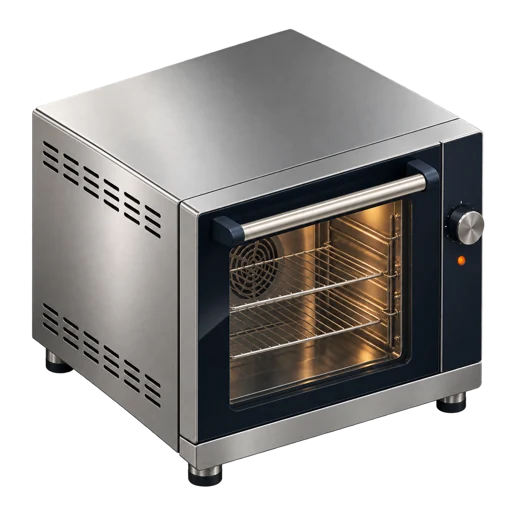
A new oven? Another location?
Start with what you know.

Bring current records to the conversation. Compare the proposed commitment with recorded cash, bills, and budgets.

Planning your next step

Review an equipment purchase.

Use the proposed oven price as an input to your discussion. Check cash and outstanding bills before agreeing on the next step.

Proposed equipment costRp 12.000.000
Recorded cash balanceRp 48.000.000
Unpaid supplier billsRp 8.000.000

Inputs for review, not a forecast or investment recommendation.

Planning your next step

Discuss a second location.

Review the existing business before adding a new commitment. Discuss rent, setup costs, and operating budgets with your team.

Proposed setup allocationRp 35.000.000
Recorded cash balanceRp 48.000.000
Unpaid supplier billsRp 8.000.000

Inputs for review, not a forecast or investment recommendation.

The owner’s view

Read the service.
Understand the business.

Review business revenue, cost of sales, operating expenses, and recorded cash. Keep budgets and unpaid commitments nearby so the next discussion starts with context.

Explore Fluxy AI
Owner’s financial view
October · business level

See the business behind the service.

RevenueRp 120.000.000
Cost of salesRp 36.000.000
Operating expensesRp 54.000.000
Net profitRp 30.000.000
Recorded cash balanceRp 48.000.000

Reports depend on complete source records and posted entries.

Questions, answered

Before you connect
your restaurant.

A few practical details about the financial connections.

How do restaurant sales connect to accounting?

Paid FluxyOS POS orders create revenue transactions with source references. Eligible accounting posting creates journals; financial statements reflect posted entries. Finance can review records that still need posting or reconciliation.

Does every menu sale include an ingredient cost?

Ingredient consumption requires configured items and recipes. Cost-of-sales entries use recorded inventory costs. Missing mappings or costs need review; an order can be sold without complete ingredient costing.

Can I compare financial performance by outlet?

Outlet profit-and-loss reporting uses posted ledger entries tagged to configured outlet dimensions and depends on access and correct attribution. Untagged entries remain unassigned. This is not multi-entity consolidation or an all-outlet POS dashboard.

Will FluxyOS decide whether I should buy equipment or expand?

No. Recorded cash, costs, unpaid bills, and budgets provide context for your review. These planning examples do not forecast returns, provide financing or investment advice, or automatically allocate money.

Where can I explore table orders and POS?

Visit the Point of Sale page for tables, orders, payment recording, receipts, and related operating workflows. This page focuses on how restaurant activity connects to the financial system.

Keep the full picture

Serve your guests.
Stay connected to your finances.

Explore FluxyOS plans or talk through the financial workflows behind your restaurant.